


First-generation devices are always the most fun to review. There is a new idea to figure out, a new set of compromises to live with, and usually one big question: Who is this actually for?
With the iPhone Duo, that question costs about $2,000.
After a week and a half of using Apple’s first folding iPhone, my takeaway is a little backwards. Most new products have a solid idea at the center and some rough edges that get better over time. The Duo is remarkably polished around the edges, but a little rough at its core.
The animations are excellent. The hinge is excellent. The inside display is genuinely wonderful. But the weight, the app situation, and a few everyday interactions make it very clear that this is generation one.
Quick Summary
- The Duo’s matte inner display, sturdy hinge, and thoughtful animations make its folding design genuinely enjoyable.
- Launch-day app support is the biggest weakness, with many apps failing to use either screen effectively.
- Battery life impresses, but camera capabilities and unlocking convenience fall short of the premium price.
- The Duo suits enthusiasts seeking pocketable tablet space more than people wanting a conventional iPhone upgrade.
Table of Contents
- Apple’s First Foldable Has Some Explaining to Do
- The Hardware: Beautiful, Solid, and Heavy
- The Inner Display Is the Hardware Highlight
- Battery Life Is Better Than I Expected
- The Cameras Are Good Enough, Not Pro
- The App Situation Is the Biggest Problem
- The Feature I Miss Most Is Face ID
- What the Duo Is Actually Great At
- Should You Buy the iPhone Duo?
- Sponsor Note: Ridge Accessories
- Original Video and Creator Credit
Apple’s First Foldable Has Some Explaining to Do
Apple has this habit of introducing a product category as though the competition does not exist. Folding phones have been around since 2019. Samsung has spent years iterating on them. This is not a brand-new idea.
But for a lot of iPhone users, the Duo is the first foldable they have seriously considered buying. That changes the assignment. Apple has to make the experience understandable to people who have never built habits around opening their phone into a bigger phone.
The opening animation is a perfect example. It is not just smooth for the sake of being smooth. It teaches you what the device is doing.
As you open the Duo, the content appears to diffuse beneath the moving surface. The effect responds to the hinge angle, so opening a little, closing a little, or moving more slowly changes the animation accordingly. Reflections and diffusion suggest that there is more screen underneath, waiting to be revealed.
My theory is that this was inspired by a lenticular sheet. Lifting that kind of sheet away from an image creates a very similar diffusion effect. I could be wrong about the inspiration, but the visual connection is pretty striking.
The important part is that the animation gives the hardware a readable logic: You are opening something to reveal an extended display. That thoughtful approach shows up all over the Duo. Unfortunately, it does not erase the physical compromises.
The Hardware: Beautiful, Solid, and Heavy
This is a very pretty phone. The back glass is one continuous piece that curves up into the plateau around the two rear cameras. The shiny titanium rails feel expensive, substantial, and very good at collecting fingerprints.
The hinge is a highlight because its resistance changes throughout the motion:
- At the beginning, it feels firm as you separate the magnets.
- Through the next part of the movement, it opens smoothly.
- Around the middle, resistance increases so the phone can hold partially open positions.
- At the end, it snaps fully open.
Closing it has the same deliberate feel, followed by that satisfying magnetic clap. Somebody spent a lot of time tuning this.
There is also an IP68 dust and water resistance rating, which is impressive for a foldable. I have mostly been treating the Duo like a normal phone: splashes, bags, everyday use. The beach is where I draw the line. I am still not interested in introducing this hinge to sand.
Premium materials do not automatically mean better ergonomics
Put the Duo beside Samsung’s Z Fold 8, and the difference in experience becomes obvious. The Samsung is significantly thinner and roughly twenty-something percent lighter. Its flatter sides are also easier to pry apart than the Duo’s slick, rounded titanium rails.
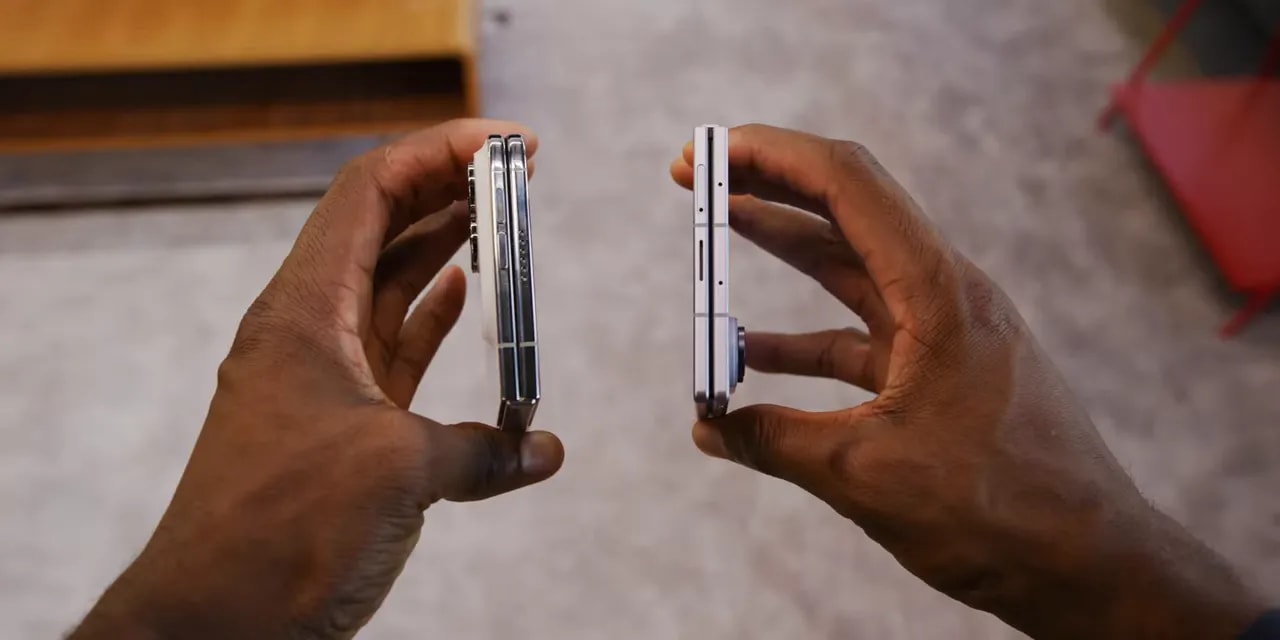
The Duo feels substantial, which initially seems appropriate for something that costs more than $2,000. But after a week or two, I would happily take the same phone with twenty percent less weight.
That is my issue with the idea that making everything metal, glass, and heavy necessarily makes it better. A MacBook Pro or a desktop tower can benefit from feeling substantial. Something you hold or wear has a different set of priorities.
Vision Pro makes the point pretty clearly. Metal feels premium in your hands, but once it is on your face, lighter plastic starts making a lot more sense. Same with AirPods Max versus lightweight plastic headphones. The Duo obviously does not go on your head, but the principle still applies.
It reminds me of the original Pixel Fold: clearly the right idea, just thicker and heavier than I want it to be.
The controls take some adjustment
This is a very right-handed phone. Held in your right hand, your thumb naturally lands on the power button and fingerprint reader. Camera Control sits near the bottom-right corner, where it is a little out of the way until you rotate the phone to take a photo.
That leaves the volume buttons at the top. They are reachable, but not especially convenient in the usual closed-phone orientation.
The software adds another reachability puzzle. On the included iOS 27.1 software, pulling down from the top-right opens Control Center. Pulling down from the middle invokes Siri. Notifications live behind a pull from the top-left corner.
Even with big hands, that last one involves some hand gymnastics.
The case situation has its own compromises
Apple’s $130 Folio case attaches magnetically to the back and slides out to cover the front. It is a clever one-piece design, and the kickstand is useful, but the rails remain exposed.
Apple’s Silicone Case uses separate front and back pieces. That covers different areas, but leaves the hinge exposed instead.
Sponsor disclosure matters here: dbrand sponsors the channel. Its $60 Grip Case for the Duo includes an integrated hinge-protection piece without the moving mechanical parts common to folding-phone cases. Of these options, it looks like the more protective approach, particularly if hinge coverage is your priority. The lineup also includes a Prism screen protector and was promoted as available through Best Buy.
The Inner Display Is the Hardware Highlight
The inside screen does not feel first-generation at all.
It is a 7.6-inch, 120Hz OLED display that matches the outer screen’s stated 3,000-nit brightness. But the specification I keep coming back to is the nanotexture finish.
It does an excellent job of hiding an already subtle crease. It cuts reflections dramatically. It also just feels nice to slide a finger across.
I put it under a microscope out of curiosity. The texture is extremely fine, and the clear area for the under-display camera becomes especially obvious at that scale.
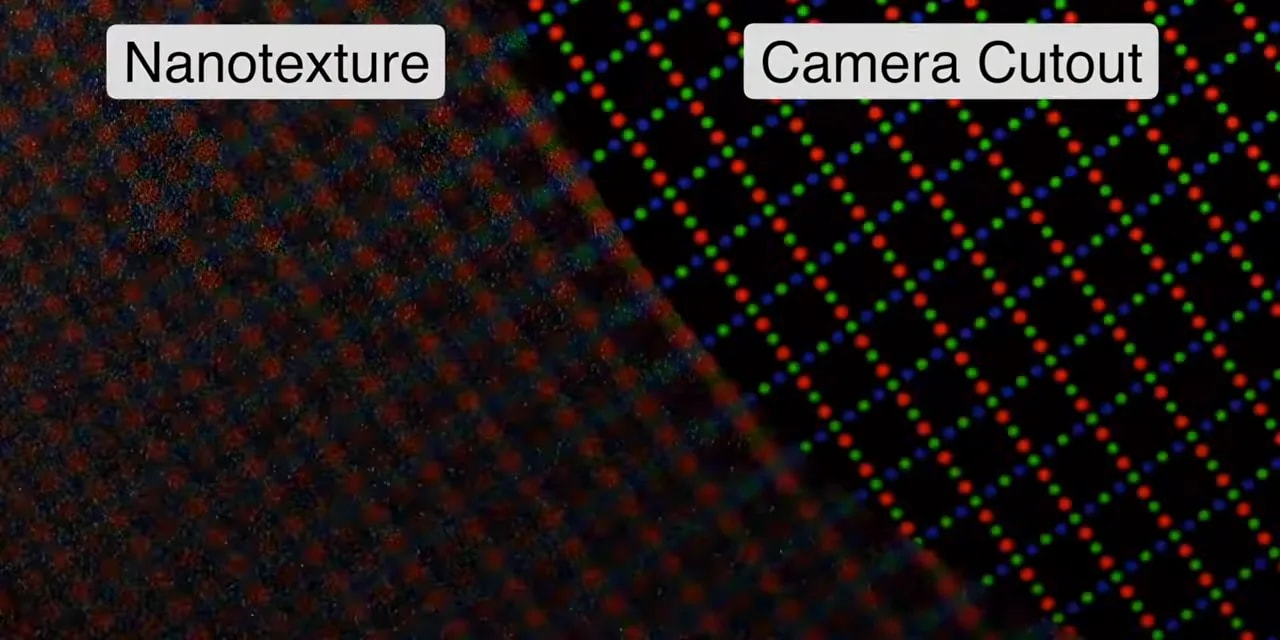
There is a trade-off: The finish diffuses some light, so text and video look slightly less sharp. At no point did that bother me enough to outweigh the benefits.
Reading on this display is great. Video looks great. Rotating it vertically gives it a little iPad mini feel, and I have found myself reading in that orientation more often than on other foldables. Conveniently, that is also when the volume-button placement starts making more sense.
The hidden selfie camera is not great
The under-display camera is where the first-generation feeling comes right back.
Still photos are bad. FaceTime video looks a little better, but this is very clearly a compromise. Apple seems to have decided that an uninterrupted inner display matters more than image quality from a camera people may use relatively infrequently.
I understand the calculation. I also wonder whether Apple will stick with it in future generations or eventually move away from it, as Samsung did.
Battery Life Is Better Than I Expected
The combined battery is about 4,900mAh, split between the two halves. In practice, battery life has been really good.
With something like 75 percent closed-screen use and 25 percent inner-screen use, this is comfortably an all-day phone and then some. Even with plenty of high-brightness use, I have regularly finished the day with more than 30 percent remaining.
The 2-nanometer A20 Pro deserves some credit. Performance is excellent, but the efficiency is just as important. Battery life has felt right around the iPhone 17 Pro I was using before this.
Spending more time on the big screen does use more power, naturally. The increase has not been as dramatic as I expected, though. This is an efficient phone.
The Cameras Are Good Enough, Not Pro
The rear setup is straightforward: a 48-megapixel main camera and an ultrawide. No dedicated telephoto camera.
I tried to pin down exactly which main sensor Apple fit into this body. A thinner device needs a camera that works within that space. You might expect a connection to the iPhone Air, but the available material seemed to point more toward the iPhone 17e. That is not a confirmed sensor identification, and it is not an insult to the results.
The Duo can take very good photos. Most of the photos and videos I made during testing were perfectly solid and mostly unsurprising.
The limitations become clearer as conditions get harder:
- Low light: The smaller main sensor needs to raise ISO earlier, producing more noise than the larger Pro cameras.
- Ultrawide detail: It is useful to have, but do not expect incredible corner-to-corner sharpness.
- Longer zoom: Beyond about 4x, the difference from a Pro iPhone with a dedicated telephoto becomes dramatic.
In weaker lighting, side-by-side results looked closer to the 17e than the 18 Pro in sharpness and noise.
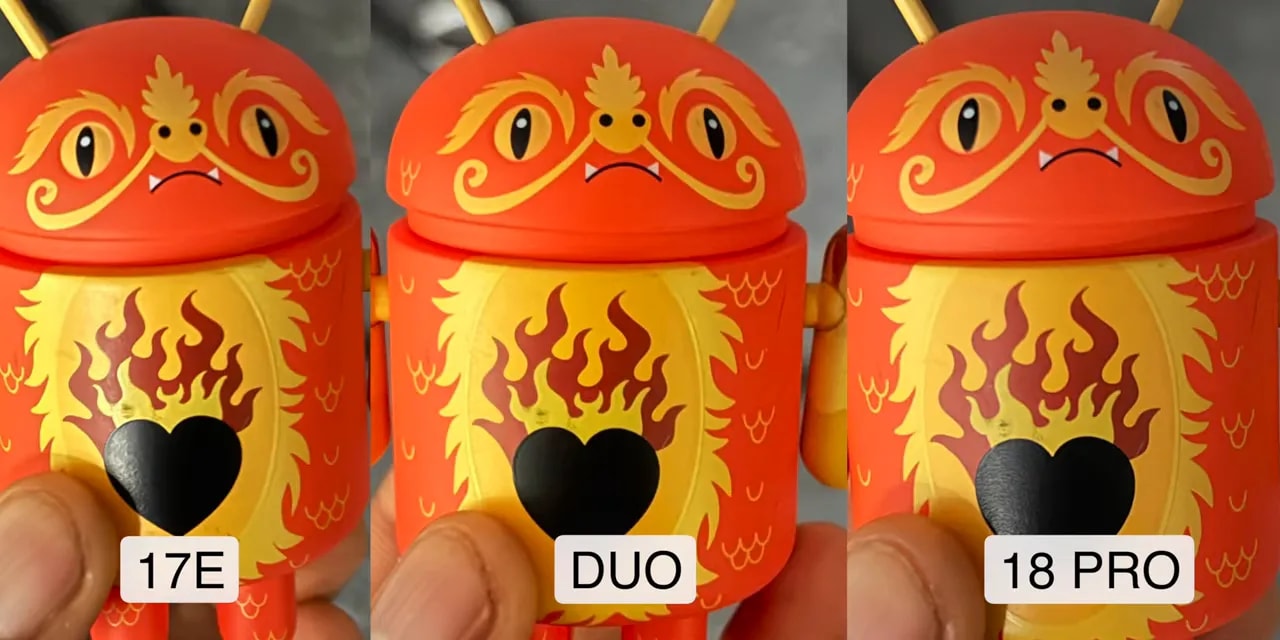
I also shot the entire Tesla Roadster reaction video on the Duo. There were almost no comments about the image quality. That does not mean nobody noticed, and I certainly noticed the familiar iPhone-footage look while editing, but the outdoor results were completely usable.
Despite the Pro chip, you do not get the Pro camera toolkit. There is no ProRes and no log recording. The 4K 30 footage I used generally looked fine, but this is not the iPhone for someone chasing the best possible filmmaking tools.
That can be hard to swallow when this is the most expensive iPhone. But the Duo is a productivity and entertainment phone with good-enough cameras, not a camera-first flagship. Its camera compromises are broadly in line with other foldables, which tend to sit below slab-style flagships.
The folding design unlocks some genuinely useful camera tricks
You can activate the outer display as a preview for the person you are photographing. They see the framing you see.
I am calling this spouse mode. Instead of taking the same photo five or six times, you can get live instructions until the framing is right. Efficient.
Kid Cue uses colorful Snoopy animations on the outer screen to encourage young kids to look toward the phone. Then there is the more important trick: using the main rear camera for selfies.
A slide-to-open control brings the preview and camera controls onto the outer display, while disabling the display facing away from you to prevent accidental touches. That gives you the highest-quality selfie option on the phone without relying on the weak inner camera.
The App Situation Is the Biggest Problem
The hardware is fun. The apps, at launch, are much less fun.
Apple’s core layout idea is clever. When the Duo is closed, the main content sits on the left. Controls that would normally occupy the top or bottom move to the right, within reach of your right thumb.
The home-screen dock becomes a right-side strip. Time, battery, and cellular signal are condensed into a small indicator. Apple’s own apps follow the same pattern, moving their controls into that reachable area.
That is the blueprint. The problem is that most of the apps I use have not adopted it yet.
Instead, you get a normal iPhone app, with its controls still at the top and bottom, plus a black bar down the right side. Spotify, Google Maps, Waze, Discord, Twitter, and Google Calendar were among the examples during testing.
Open the Duo, and many apps remain small phone-shaped windows in the middle of a large screen. Rotating the device does not necessarily fix it. It feels like the early iPad days, when enlarging an iPhone app was the fallback experience.
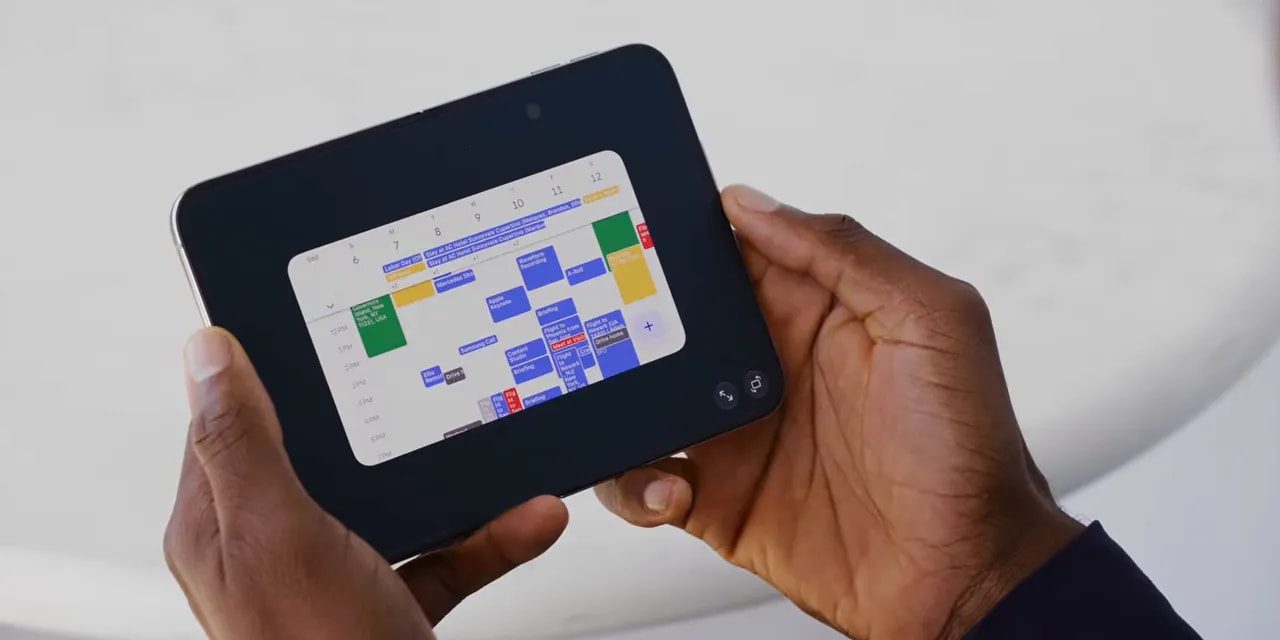
Some apps, including Spotify and Flighty, stretch across more of the display, but still do not feel properly designed for the Duo.
These developers need to make Duo-specific layouts. An existing iPad app is not automatically the answer.
I expect the situation to improve substantially over the following months, possibly around six months as developers get hardware and build updates. Apple is good at bringing developers along. But that is an expectation, not something the launch experience already delivers.
And some apps will probably never make the jump. Arc Mobile is no longer being developed, so that means finding another browser. The gym app I use every day does not seem like an obvious candidate for a dedicated update either.
There are encouraging examples. Instagram received its update during the review period. Carrot Weather already puts controls on the right when closed and expands into a useful two-column layout when open. More of that, please.
There are some early software bugs, too
I experienced a few freezes and odd behaviors, though not catastrophic failures requiring a full phone restart.
The continuity animation can get confused if you open very slowly, stop halfway, and try interacting with the display. The phone is juggling hinge angle, orientation, app placement, and whether it should enter StandBy.
To be fair, some of this came from deliberately pushing unusual combinations. Open and close normally, and the transition is generally quick and clean.
The Feature I Miss Most Is Face ID
The Duo does not have Face ID. There is not enough depth for the hardware, so Apple uses a fingerprint reader in the power button instead.
The reader itself is fast. The frustrating part is an intentional delay.
On many fingerprint-equipped phones, touching the sensor with a registered finger unlocks immediately. If you only want to check the lock screen, you learn to wake it with a different finger.
Apple has built a pause into the Duo’s normal unlocking behavior. Touch the reader with your registered finger, and it stops on the lock screen for a beat. Keep holding, and it unlocks.
I get the reasoning. It gives someone a chance to check notifications without accidentally skipping the lock screen. But it also makes a fast fingerprint reader feel slow, and I could not find a setting to disable that pause.
There is a workaround:
- Wake the display.
- Swipe up.
- Touch the fingerprint reader.
Then it unlocks almost instantly. Great. I just wish that did not require three actions.
Coming from another iPhone, I think Face ID will be the thing people miss most. Not the zoom camera. Not even the thinner body. Face ID.
What the Duo Is Actually Great At
There are flashes of greatness here that make the whole concept click. They start with doing two things at once.
Two apps side by side
YouTube on one side, notes on the other. A video call beside something you need to reference. An email confirmation code beside the login page asking for it.
None of that sounds wild until you stop bouncing between apps and just do the task. The main learning curve is remembering that you can.

Tap the center divider, and the two apps lock into a pair that visually resembles a book. Open that pair later, and both apps return together. Tap again to unpair them.
You can also go home on one half without disturbing the other, or switch recent apps on just one side. It is intuitive and clean.
The limitation is equally straightforward: two apps, side by side, each occupying half the screen. No third window and no more elaborate window arrangement. Still, that is something a regular iPhone cannot do.
For science, I also tried Instagram Reels and TikTok simultaneously. Technically possible. Audio kept switching between them and occasionally behaved strangely. Maybe not hearing both at once is a public service. Please do not make this your main use case.
The halfway-open position
The hinge’s strong middle resistance makes the Duo especially good at remaining partially open, and the software takes advantage of it.
Partially fold it while typing, and the keyboard splits to keep your thumbs away from the center. Some apps put content on one half and typing or playback controls on the other.
Put it into a tent shape, and it automatically enters StandBy, even without being plugged into power.
In a vertical arrangement, it can show two different customizable screens. Horizontally, it becomes one larger clock, weather display, calendar, or another selected screen. Battery life is good enough that leaving it on a desk showing notifications has not been a concern in my use.

And yes, the underglow alarm-clock effect is pretty awesome.
Continuity that usually just works
The speed of the normal open-to-closed transition is excellent. Start writing an email with an attachment, realize you want more room, open the phone, and keep going exactly where you left off.
You can even open it in the middle of a scroll, and it finishes that movement on the larger display. Those little moments make the folding screen feel like an extension of what you were already doing, rather than a separate mode you have to manage.
Polish that explains the interface
The visual details are not random decoration. Pairing apps makes them look connected. Dynamic Island has animations adapted to its side position. Close the camera app, and the pixels contract to conceal the inner camera again.
The compact time, battery, and signal indicator becomes easy to read with familiarity. The dots along the bottom represent cellular signal strength.
Even the display proportions feel deliberately coordinated. The camera sensor’s aspect ratio matches the outer screen, which also matches the inner screen rotated 90 degrees. The camera viewfinder fills the display without black bars.
That is a nice touch. A lot of these small decisions add up.
Should You Buy the iPhone Duo?
The simplest pitch is this: about $2,000 gets you something like a 120Hz OLED iPad mini that fits in your pocket.
If that is something you have always wanted, the Duo makes a lot of sense. The inner display, multitasking, sturdy hinge, and thoughtful transitions give it a genuine reason to exist.
But being the newest iPhone does not make it the right iPhone for most people.
- Mostly texting, social media, and occasional browsing? Probably not worth the extra cost and compromises.
- Need the best iPhone cameras and professional video tools? This is not that phone.
- Regularly drop and break your phones? An expensive first-generation foldable is probably not the move.
- Want a pocketable larger screen and can comfortably afford it? This is where the Duo becomes interesting.
If the price, or an illustrative jump from roughly $35 to $55 a month, does not mean much to you, there is a lot of fun here after the learning curve. Getting used to life without Face ID takes time. So does building the habit of opening two apps together.
App support should improve, but I would not treat every future update as guaranteed. Some favorite apps may remain awkward.
Apple also has not engineered away the basic trade-offs of this form factor. The thickness, weight, and compromises in cameras, speakers, and battery relative to conventional flagships still exist, even though battery life itself has been a pleasant surprise.
So yes: polished, but rough. The excellent animations, incredible hinge, and wonderful inner display make it more enjoyable than that description might suggest.
This is an admirable first generation. A second generation that meaningfully addresses the weight, unlocking behavior, and app experience could be an amazing phone.
Sponsor Note: Ridge Accessories
Ridge sponsored the accessory segment of the original review. Its 5-in-1 power bank combines a 10,000mAh battery, MagSafe, built-in cables, an Apple Watch charging pad, and hub functionality while plugged in.
The tracker card is credit-card sized, supports Apple Find My and Google Find Hub, charges wirelessly, and is rated for up to ten months between charges.
At the time of the review, Ridge promoted a Friends and Family offer with three power banks for the price of two. Check the offer page for current availability and terms.
Original Video and Creator Credit
This article is adapted from iPhone Duo Review: First Generation Fun!, created by Marques Brownlee (MKBHD). Full credit for the original video, testing, observations, and review content belongs to Marques Brownlee and the MKBHD channel. Apple provided the phone for review.


Be the first to comment